Uxbridge Fall Fair, 180 Main St. S, Elgin Park, Uxbridge, ON
Using the Uxbridge Fall Fair logo
Thank you for helping us share the fall fair. These few guidelines keep our logo clear and easy to read wherever it shows up, from sponsor boards and banners to the newspaper.
Every version of the logo is free to download below. If you only need one, use the boxed version.
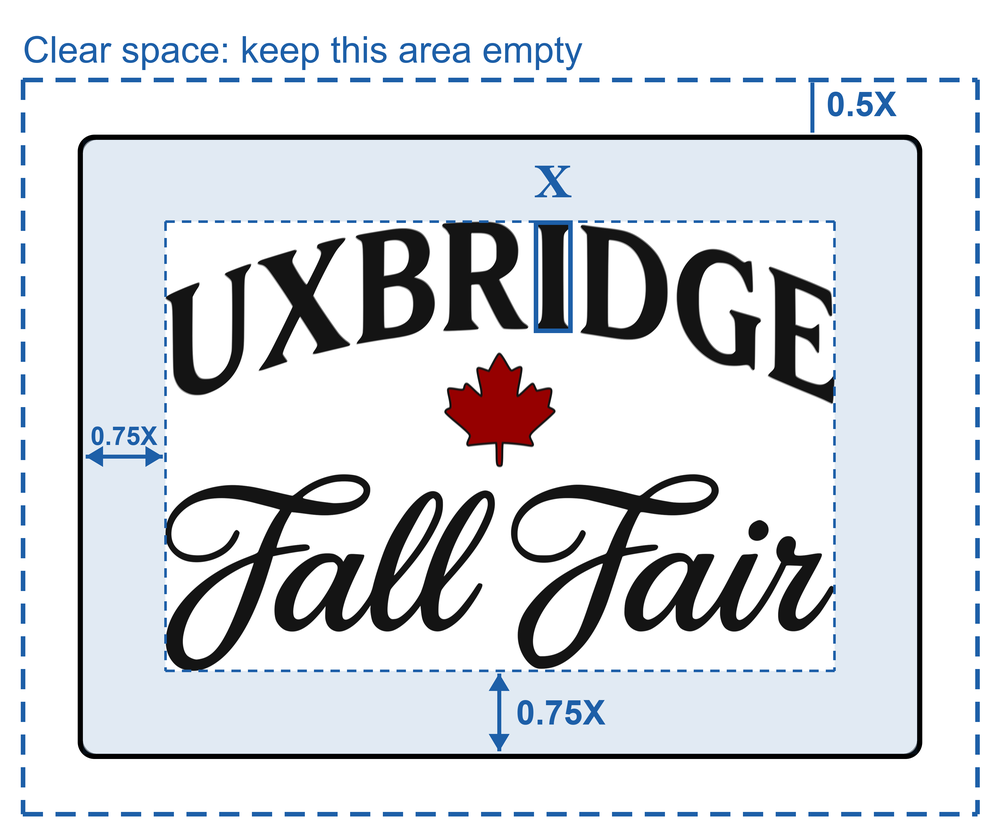
The logo has 0.75X of white space on every side. This is already built into the file, so please use it as is and don’t crop it.
Outside the box
Leave at least 0.5X of clear space around the box (1X is better) before any text, photos, other logos or the edge of the page.
Smallest size
120 pixels wide on screen. Below that, “Fall Fair” gets hard to read, so use the maple leaf instead. In print, if you can’t read “Fall Fair” comfortably, the logo is too small.
Our colours
Black #141414
Maple red #960000
Please don't
Stretch or squash it
Always resize from a corner so it keeps its shape.